A useful audit does more than produce a long list of warnings. It explains which pages are affected, why each issue matters and what should be fixed first. Without that context, teams can spend hours correcting minor metadata warnings while serious indexing, canonical or internal linking problems remain unresolved.
This SEO audit checklist provides a practical process for examining a website in 2026. It covers crawlability, indexability, redirects, canonical tags, internal links, metadata, content structure, images, structured data, page experience and post-fix validation.
The objective of this SEO Audit Checklist is not to achieve a perfect audit score. The objective is to remove the issues that prevent important pages from being discovered, indexed, understood and used effectively by visitors.
What Should an SEO Audit Accomplish?
A complete SEO audit should answer four questions:
- Can search engines access the pages that matter?
- Can they correctly identify which versions should be indexed?
- Can they understand the purpose and relationship of those pages?
- Can users access and interact with the content without unnecessary friction?
Google Search broadly processes pages through crawling, indexing and serving. A problem at an early stage can prevent later optimization from having any meaningful effect. A page that cannot be crawled, for example, cannot benefit from an improved title tag or better content until the accessibility problem is resolved. This is why an SEO Audit Checklist should follow a logical order. Crawl and indexing problems come first, followed by site architecture, on-page relevance, content quality and performance.
Find the issues holding your site back before rankings drop
Crawl your website, uncover technical and on-page SEO issues, and see which pages need attention first. SerpVision groups findings by severity so your next SEO sprint starts with the fixes that matter.
No credit card required. Audit on your schedule.
Before You Start the Audit
Before running a crawler or reviewing individual URLs, define the scope of the audit.
A small company website may require a full crawl of every accessible URL. A large ecommerce or publishing site may need to be divided into directories, templates or page types so that the findings remain manageable.
Record the following information before making changes:
- Current organic clicks and impressions
- Important keyword positions
- Indexed page counts
- Organic landing pages
- Conversions from organic traffic
- Recently deployed website changes
- Known migrations, redesigns or CMS updates
These benchmarks help distinguish pre-existing problems from issues introduced during the audit or implementation process.
They also make it possible to evaluate whether a fix produced a meaningful result. Removing 500 warnings is not valuable by itself if those warnings affected unimportant URLs and had no measurable effect on crawling, visibility or user experience.
Core SEO Audit Checklist Areas to Review
A complete SEO Audit Checklist involves reviewing multiple technical, structural, and on-page elements that affect how search engines crawl, index, and understand your website. The following sections break down the most important areas you should evaluate to identify issues and improve overall search performance.
1. Confirm That Important Pages Are Crawlable
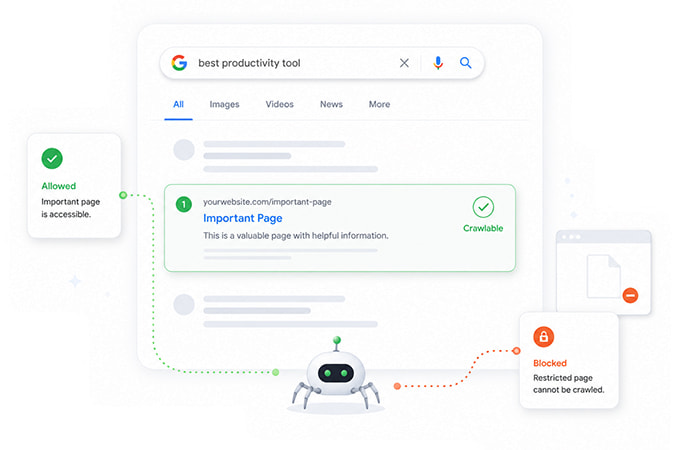
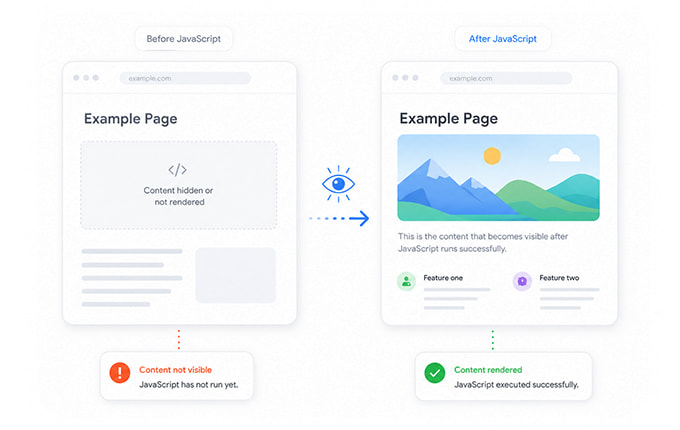
Begin by checking whether search engines can request the pages that are intended to appear in search results. Look for important URLs blocked through robots.txt, firewall rules, authentication requirements, server configuration or crawler-specific restrictions. Also review whether CSS, JavaScript and other resources required to render the page are accessible.
A page may load correctly for a normal user while presenting a different or incomplete response to a search crawler. This is especially relevant for JavaScript-heavy websites, where content may depend on client-side rendering.
Google processes JavaScript pages through crawling, rendering and indexing. Rendering problems can therefore prevent important content or links from being processed correctly even when the initial HTML response loads successfully. During the crawlability review in your SEO Audit Checklist, identify:
- URLs blocked by
robots.txt - Pages requiring authentication
- Server errors and timeouts
- Resources blocked from rendering
- Crawl traps and infinite URL combinations
- Important links that cannot be followed
A blocked page is not automatically a mistake. Admin areas, internal search results and duplicate filter combinations often should not be crawled. The SEO Audit Checklist should distinguish intentional restrictions from accidental ones.
2. Review Robots.txt and Noindex Directives
robots.txt and noindex solve different problems. A robots.txt rule controls whether a compliant crawler may request a URL. A noindex directive tells a search engine not to include a crawled page in its index.
Using robots.txt to remove a webpage from Google is a common mistake. Google specifically states that robots.txt is mainly used to manage crawler access and is not the correct mechanism for keeping a webpage out of search results. A page must generally remain crawlable for Google to see a noindex directive. If the same URL is blocked in robots.txt, Google may be unable to access the page and discover the instruction. As part of your SEO Audit Checklist, check for:
- Important pages carrying an accidental
noindex - Noindex pages included in XML sitemaps
- Pages blocked in robots.txt that are expected to rank
- Private or thin pages that are still indexable
- Conflicting robots directives
- X-Robots-Tag headers applied to non-HTML files
Every directive should reflect a clear indexing decision rather than a default CMS setting that nobody has reviewed.
3. Audit the XML Sitemap
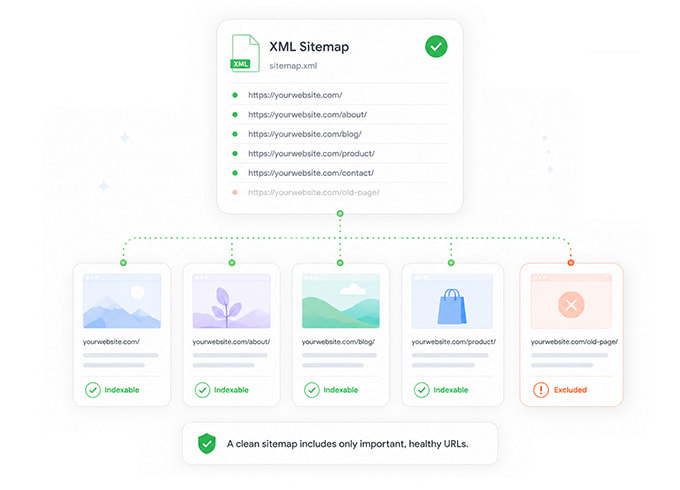
An XML sitemap helps search engines discover the canonical URLs that a website considers important. A sitemap is particularly useful for large sites, new websites, content archives and sites where some pages are difficult to reach through normal navigation. However, submitting a sitemap does not guarantee that every included URL will be crawled or indexed. As part of your SEO Audit Checklist, the sitemap should contain URLs that are:
- Canonical
- Indexable
- Accessible with a successful status code
- Valuable enough to appear in search
- Updated when meaningful content changes
Remove URLs that redirect, return errors, carry noindex, point to duplicate content or canonicalize to another page.
Also compare the sitemap against the crawl. Important pages missing from the sitemap may indicate weak content discovery, while sitemap URLs absent from the internal link structure may reveal orphaned pages.
4. Check HTTP Status Codes
HTTP status codes reveal how the server responds when a crawler or visitor requests a URL. The most important categories are:
- 200: The request was successful.
- 301 or 308: The resource has permanently moved.
- 302 or 307: The move is temporary.
- 404 or 410: The resource is unavailable.
- 5xx: The server could not complete the request.
Not every 404 is harmful. Deleted products, expired events and intentionally removed pages may correctly return a 404 or 410. The problem appears when internal links, navigation, sitemaps or valuable external links continue pointing to missing URLs. This wastes crawl activity, interrupts user journeys and may discard authority that could have been redirected to an appropriate replacement.
Prioritize status code issues according to the importance of the affected page and the number of internal paths pointing to it within your SEO Audit Checklist.
5. Find Redirect Chains and Loops
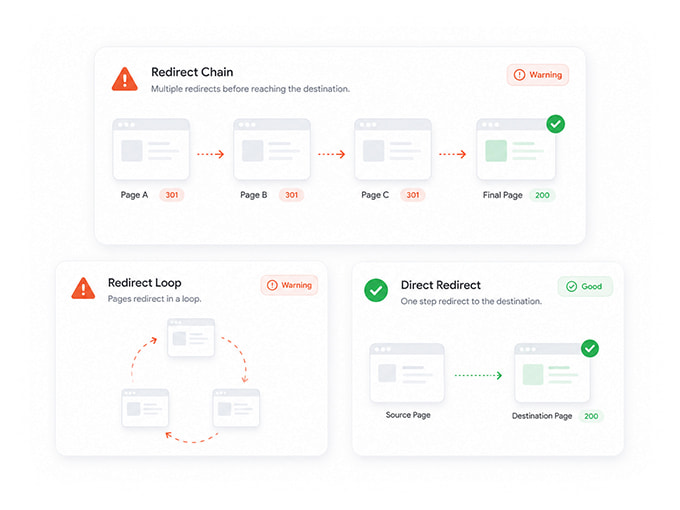
A redirect should normally take users and crawlers directly from the old URL to the final destination.
A redirect chain occurs when one URL redirects through several intermediate URLs before reaching the final page. A redirect loop occurs when URLs repeatedly redirect to one another without reaching a valid destination.
Common causes include repeated migrations, changes to permalink structures, HTTP-to-HTTPS rules, trailing slash inconsistencies and overlapping redirect plugins. During the audit:
- Replace internal links that point to redirected URLs
- Update old redirect rules to point directly to the final URL
- Remove loops
- Check redirects on mobile and desktop variants
- Review redirect behavior across HTTP, HTTPS, www and non-www versions
Redirects should preserve the user’s original intent. Redirecting every removed page to the homepage may avoid a 404, but it often creates an irrelevant destination.
6. Review Canonical Tags and Duplicate URLs
A canonical tag indicates the preferred version among duplicate or substantially similar URLs. Canonicalization is particularly important for ecommerce filters, tracking parameters, print versions, syndicated content and CMS-generated URL variations.
Google treats canonical signals as preferences rather than absolute commands and may select a different canonical when other signals are inconsistent. As part of your SEO Audit Checklist, check for:
- Missing canonicals on duplicate page groups
- Canonicals pointing to redirected or broken URLs
- Canonicals pointing to non-indexable pages
- Multiple canonical tags
- HTTP pages canonicalizing incorrectly
- Parameter URLs treated as standalone pages
- Important pages canonicalizing to unrelated content
Canonical signals should agree across internal links, sitemaps, redirects and page markup. A page should not be included in the sitemap as important while simultaneously canonicalizing to another URL.
7. Test JavaScript Rendering
Modern websites frequently use JavaScript to load navigation, product data, filters, article content and internal links. Compare the initial HTML response with the rendered page. Important text and links should remain available to search engines after rendering.
Check whether:
- Main content appears only after user interaction
- Links lack standard anchor elements and
hrefattributes - Rendered content differs from what users see
- JavaScript errors prevent sections from loading
- Lazy-loaded content never becomes discoverable
- Client-side routing creates inaccessible URLs
Google can reliably crawl conventional <a href="..."> links. Links implemented only through script events or unsupported elements may not be extracted consistently. Rendering should be tested on representative templates rather than only the homepage as part of your SEO Audit Checklist.
8. Find Broken Internal Links
Internal links help users move through the website and help search engines discover and interpret pages. A broken internal link points to a URL that no longer provides the expected content. Broken links may appear in navigation, articles, product descriptions, breadcrumbs, footers or automatically generated modules.
The SEO Audit Checklist should identify:
- The broken destination
- Every source page linking to it
- The intended replacement
- Whether the link should be updated or removed
Fix links at their source whenever possible. Adding a redirect can preserve access, but updating the original link creates a cleaner and more efficient path. Template-level issues deserve priority because one change may repair hundreds of affected pages.
9. Identify Orphan Pages and Excessive Click Depth
An orphan page has no meaningful crawlable internal link pointing to it. These pages may still be discovered through a sitemap or an external link, but their isolation makes them harder for users and search engines to reach within the website structure.
Compare crawl data with:
- XML sitemap URLs
- Search Console landing pages
- Analytics landing pages
- CMS exports
- Backlink data
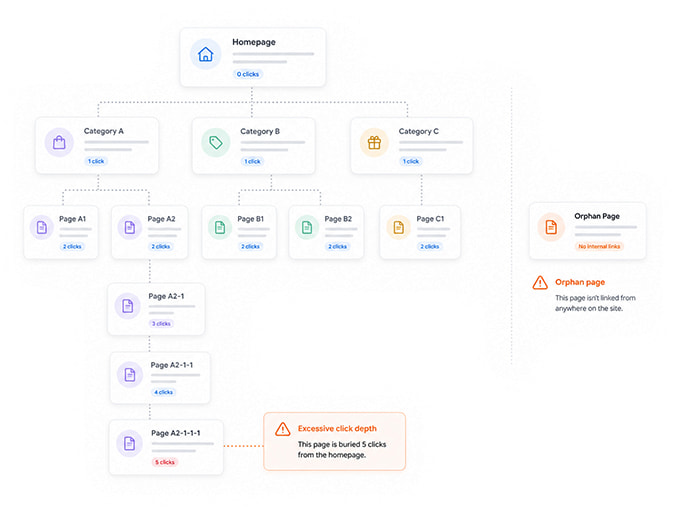
Any URL found in those sources but absent from the crawl may be orphaned. Not every orphan page needs to be linked. Old campaign pages, test pages or obsolete content may need to be removed or excluded instead.
For valuable pages, add contextual links from relevant hubs, categories or supporting articles. Avoid adding hundreds of unrelated footer links merely to reduce click depth.
10. Audit Title Tags
A title tag helps users and search engines understand the primary subject of a page. Look for titles that are:
- Missing
- Duplicated
- Generic
- Inconsistent with the page content
- Overloaded with repeated keywords
- Identical across several templates
Duplicate titles do not always mean the pages are duplicates, but they often make it harder to distinguish the purpose of each URL.
A useful title should describe the page accurately, differentiate it from nearby pages and align with the search intent it is designed to satisfy.
Avoid rewriting titles based only on a fixed character count. Search result presentation depends on available space, query context and device width. Clarity and relevance are more important than reaching an arbitrary length.
11. Review Meta Descriptions and Search Snippets
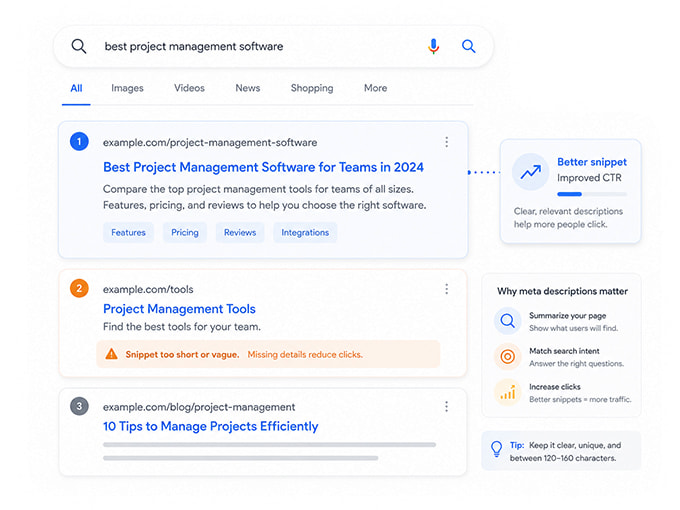
A meta description can influence how a page is presented in search, although Google may generate a different snippet when another part of the page better matches the query.
Audit descriptions for:
- Missing values
- Large-scale duplication
- Outdated offers or pricing
- Descriptions unrelated to the visible content
- Pages where the same CMS template is repeated
- Weak wording that provides no reason to visit
Priority should be given to important landing pages receiving significant impressions. Writing unique descriptions for thousands of low-value URLs may provide less value than improving the pages already visible in search.
The description should summarize the page honestly and help the user understand what they will find after clicking.
12. Check Heading and Content Structure
Headings organize content for users and help communicate the relationship between sections. Review whether each important page has a clear main heading and whether subsequent headings accurately describe the content that follows.
Multiple H1 elements are not automatically an SEO failure. The more important issue is whether the page structure remains understandable and whether the headings reflect a logical hierarchy.
Look for:
- Missing or generic main headings
- Headings used only for visual styling
- Repeated headings across unrelated sections
- Important sections hidden inside unstructured text
- Pages where the heading promises something the content does not provide
A clear structure also improves accessibility and makes long pages easier to scan.
13. Evaluate Content Quality and Search Intent
Technical accessibility is necessary, but an indexable page still needs a useful reason to appear in search.
Review whether each important page:
- Satisfies a distinct search intent
- Provides accurate and current information
- Offers more than a rewritten summary of competing pages
- Contains clear ownership and author information where relevant
- Avoids unnecessary duplication
- Gives users a logical next step
Thin and overlapping pages should not automatically be merged or deleted. Review their traffic, links, purpose and audience before making a decision.
When several pages compete for the same intent, choose a primary page and decide whether the others should be consolidated, repositioned or differentiated.
14. Validate Structured Data
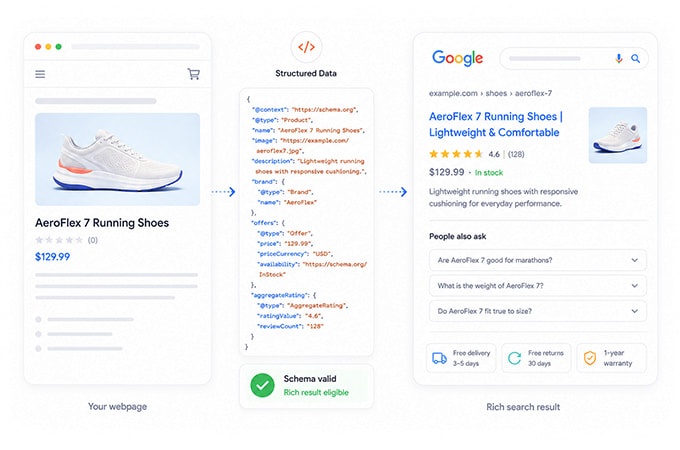
Structured data helps search engines understand certain types of visible page information and can make eligible pages available for supported rich results.
Audit the markup for:
- Syntax errors
- Missing required properties
- Values that do not match the visible content
- Unsupported schema types
- Markup copied across incorrect templates
- Deprecated properties
- Multiple conflicting entities
Structured data eligibility does not guarantee that Google will display a rich result. The markup must remain accurate, supported and consistent with the page. idate representative templates and monitor Search Console enhancement reports after deployment.
15. Audit Images
Image optimization affects accessibility, performance and image search visibility.
Review:
- Missing or unhelpful alt attributes
- Images far larger than their rendered dimensions
- Unsupported or inefficient formats
- Layout shifts caused by missing dimensions
- Important images loaded only through inaccessible scripts
- Decorative images carrying unnecessary alt text
- Product or article images without surrounding context
Alternative text should describe the image when that description helps someone understand the content. It should not be treated as a location for repeating target keywords.
For decorative images, an empty alt attribute may be more appropriate than a forced description.
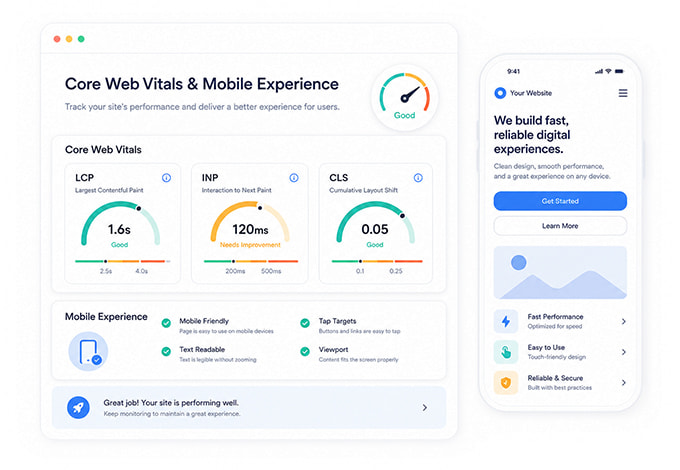
16. Review Core Web Vitals and Mobile Experience
Core Web Vitals measure loading performance, responsiveness and visual stability through:
- Largest Contentful Paint
- Interaction to Next Paint
- Cumulative Layout Shift
Google recommends an LCP of no more than 2.5 seconds and an INP below 200 milliseconds for a good experience. Core Web Vitals are used by Google’s ranking systems, but strong scores alone do not guarantee high rankings. field data where available because laboratory tests cannot fully represent the experience of real visitors.
Also check:
- Mobile navigation
- Text readability
- Tap target spacing
- Intrusive overlays
- Content hidden on smaller screens
- Forms and interactive controls
- Layout movement during loading
Performance fixes should focus on templates and components that affect many important pages.
17. Prioritize Findings by Impact
The final audit report should not be ordered merely by the number of warnings. A missing meta description on 500 low-value archive pages may be less urgent than one accidental noindex directive on the site’s main revenue page.
A practical priority model can include:
- Critical: Issues that prevent important pages from being crawled, rendered or indexed. Examples include server failures, accidental noindex directives, blocked resources, canonical errors on key pages and broken redirects after a migration.
- High Priority: Issues that substantially weaken discovery, consolidation or user access. Examples include broken internal links to important pages, orphaned landing pages, large redirect chains and duplicate templates creating uncontrolled URL variants.
- Medium Priority: Issues that affect search presentation, relevance or accessibility but do not normally prevent indexing. Examples include weak titles, missing descriptions, unclear headings and incomplete image attributes.
- Low Priority: Cosmetic, isolated or low-impact warnings that can be addressed after more important work is complete. Severity should also account for page value. An issue affecting a page with strong rankings, links or revenue should usually be reviewed before the same issue on an unused archive page.
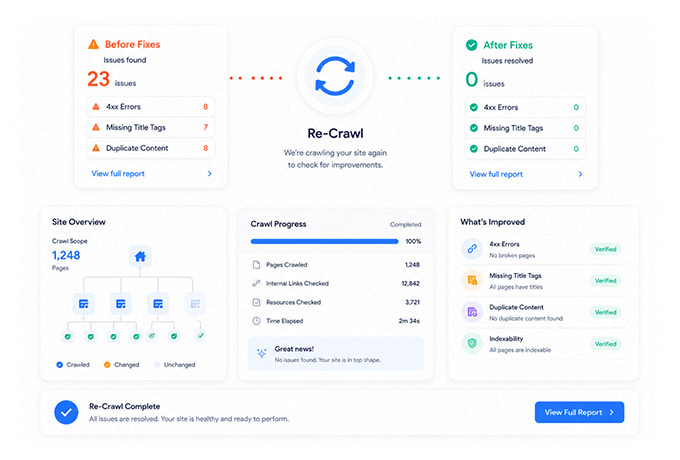
18. Re-Crawl the Site After Fixes
An audit is incomplete until the fixes have been validated. After deployment, run the crawl again and confirm that:
- The original issue has disappeared
- The fix did not create a new problem
- Redirects reach the intended destination
- Canonical tags remain consistent
- Important pages are still indexable
- Internal links now point directly to valid URLs
- Sitemap files have been updated
- Search engines can access the revised output
Keep a record of issue counts across audits. A declining count shows cleanup progress, while recurring issues may indicate that a CMS template, deployment process or editorial workflow needs to be corrected.
How SerpVision Supports the Audit Workflow
A manual review is useful for understanding individual pages, but a site-wide crawler makes the process repeatable. The SerpVision SEO audit tool crawls technical and on-page signals across a website, groups findings by severity and shows the pages affected by each issue.
Audit findings can then be reviewed alongside ranking and Search Console context, helping teams prioritize pages that already carry search visibility rather than treating every warning as equally important.
After fixes are deployed, another crawl can confirm what was resolved and whether new issues appeared.
SerpVision does not automatically modify your CMS or codebase. It identifies and prioritizes issues so that the appropriate developer, SEO specialist or content editor can apply the fix and validate the result afterward.
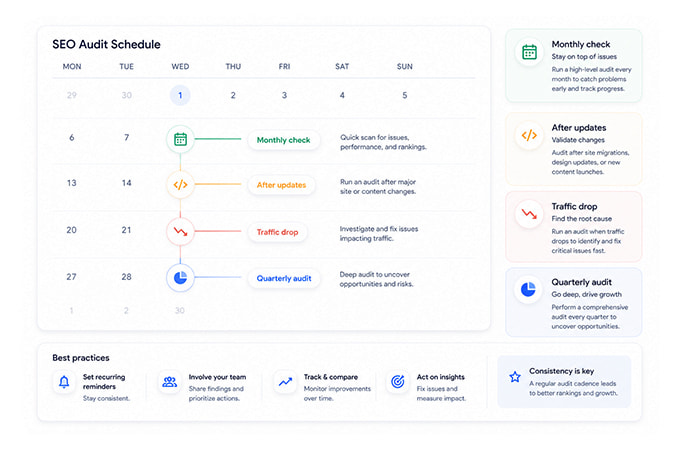
How Often Should You Run an SEO Audit?
A monthly audit is a useful baseline for an actively managed website, but the correct schedule depends on how frequently the site changes. Run an additional audit after:
- A website migration
- A redesign
- A CMS or plugin update
- A large content release
- Navigation changes
- Changes to URL structures
- Redirect implementation
- Server or hosting changes
- A sudden ranking or traffic decline
Large ecommerce and publishing websites may benefit from more frequent crawls because templates, inventory and internal links change continuously. Smaller sites with infrequent updates may need less frequent full crawls, provided that critical pages and Search Console reports are still monitored.
Common SEO Audit Mistakes
One of the most common mistakes is attempting to fix every warning in the order it appears. Audit tools can identify patterns, but they do not know the commercial importance of every page, the reason a directive was implemented or the strategic purpose of a URL.
Another mistake is treating an audit score as the objective. A website can achieve a high score while offering weak content, targeting the wrong search intent or generating little business value.
Teams also create problems when they implement bulk changes without testing representative pages. A global canonical, redirect or metadata rule can affect thousands of URLs at once. Start with a small sample, confirm the intended result and then deploy the change more broadly.
Finally, avoid assuming that every recommendation from a third-party tool is based on Google’s internal ranking systems. Google notes that external SEO tools do not have access to its internal ranking data and cannot guarantee search performance.

Join the conversation
Share your question, add a practical note, or continue the discussion below.
No comments yet
Be the first to add a thought to this article.